 FLOCKPOINTChurch Portal & Membership RosterFLOCKPOINTChurch Portal & Membership Roster
FlockPoint gives congregation leaders, finance admins and treasurers a live picture of how the church is tracking — totals, pace, pledge coverage, participation. No leader screen anywhere in the system shows what a single member gave.

A portal and a ledger in one system: the roster your leaders work from every week, and the giving record your church reports on every month.
Built around how growing churches are actually organised — congregations, zones, small groups and family groups — so the structure in the software matches the structure in the room.What a person sees afterwards is decided by their role in the structure, not by who asks.
Create zones and small groups, import the roster, assign a leader to each group. From then on the app knows who reports to whom, and access follows it automatically.
Small group and zone leaders log Ministry Offering and Special Contribution as it comes in. Finance Admin verifies. Nobody re-keys a spreadsheet or reconciles two versions of the truth.
Totals, pace and participation roll up into a board you can screenshot, project or send — because it holds no individual figures to begin with.
Churches hesitate to put giving into software because someone, someday, will go looking. FlockPoint removes the possibility rather than the permission. Pick a role and see the same record as that person sees it.
Masked values are not merely hidden in the interface — they are never sent to that role's session.
| Data | Congregation | Finance | Zone | Group | Member |
|---|---|---|---|---|---|
| Congregation and zone totals | ● | ● | ● | — | — |
| Small group totals | ● | ● | ● | ● | — |
| Participation rate | ● | ● | ● | ● | — |
| Who has pledged | — | ● | — | — | — |
| A named member's amount | — | — | — | — | own only |
| Benevolence request details | — | bearer | — | — | own only |
| Audit log | ● | ● | — | — | — |
Aggregate views have no link to a person's giving. The route does not exist, so it cannot be walked.
If your church designates records custodians, their access is explicit, limited, and written to the audit log every time.
Export the full roster and ledger whenever you want. Leaving does not cost you your history.
Encrypted in transit and at rest, with regular backups and a documented restore path.
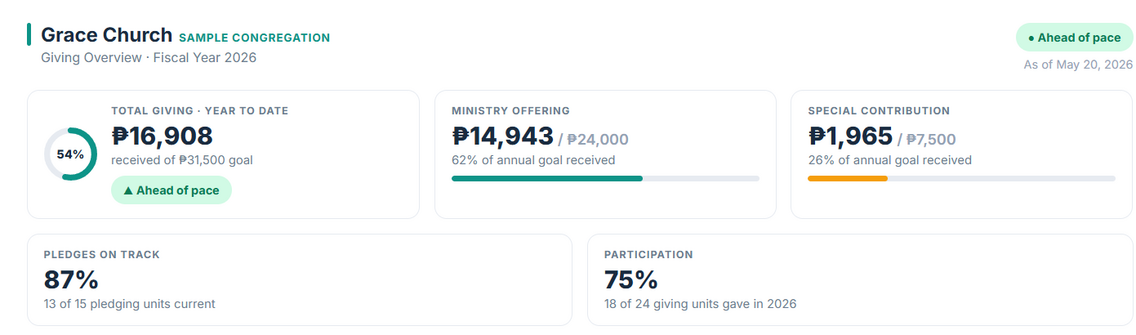
Congregation totals, pace against goal, pledge fulfilment and participation on one 16:9 slide — safe to project at a members' meeting.
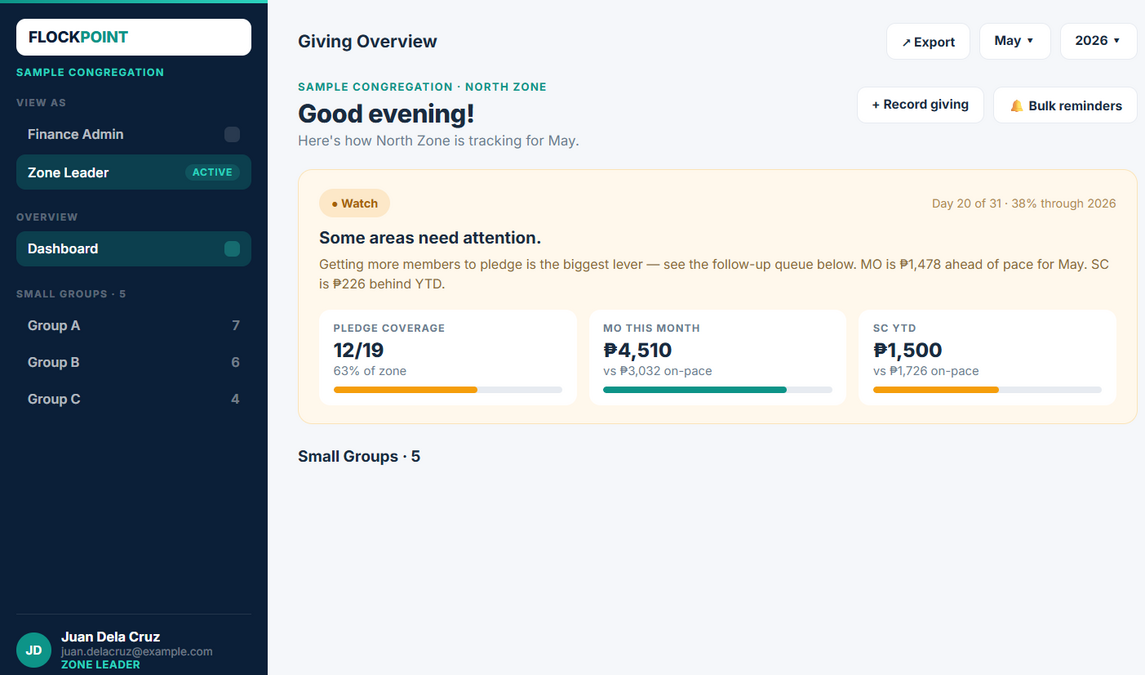
Not just a figure. The dashboard says where the zone stands against pace and which small group needs a follow-up this week.
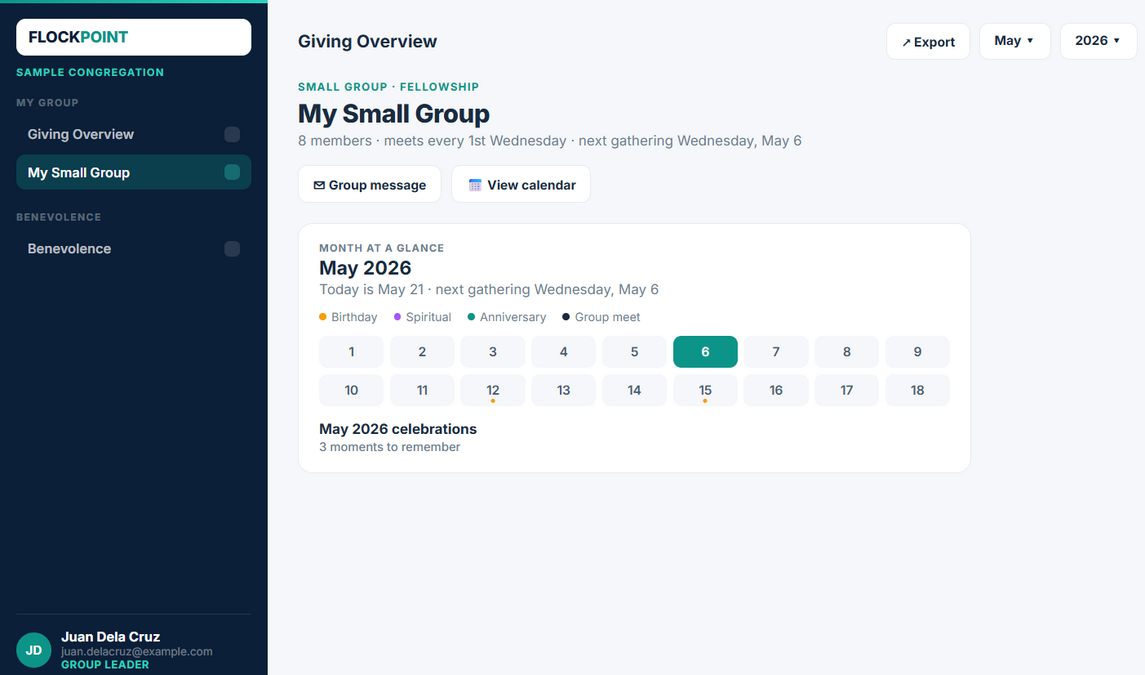
The group view leads with people: who is meeting when, whose birthday and spiritual anniversary are coming, and what the group owes this month.
No spreadsheet, no manual re-entry — members submit their own pledge, and Finance Admin reviews it before it posts.
Title, year, an open/close window, and optional per-area Special Contribution goals. Share it as a link or a QR code — no login required to open it.
Ministry Offering monthly and/or Special Contribution annually, individually or as a couple, straight from their phone.
Each submission is approved or rejected before it posts to the ledger, so nothing lands unchecked.
No. Leader-facing screens are built on aggregates — zone totals, small group totals, participation rates. There is no member-level giving view for a leader to open, so the answer does not depend on trusting anyone's restraint.
The member, in their portal. A church may also designate a small number of records custodians on the finance team whose access is logged. That is a setup decision your leadership makes explicitly, not a default.
Personal data is collected for a stated purpose, kept to what the ministry actually needs, and exportable or deletable on request. Access is role-scoped and logged. We will walk your leadership through the specifics for your country's requirements before you commit.
Access follows the structure. Reassign the group and the former leader loses that view immediately, including anything they could previously see about it.
Yes. Both are tracked against their own goal and their own pace through the year, because they behave differently and get reported differently.
Requests, approvals and fund release run through a designated benevolence bearer with an audit trail. Requests are visible to the people handling them, not to the wider leadership.
Yes. Congregations are first-class, and regional leadership can be given a rolled-up view across churches without inheriting access to anything below the aggregate.
Roster import from a spreadsheet, then structure setup in the app. We help with the first import and the first month of giving so your numbers reconcile against what you already have.
Pricing depends on church size and how many congregations you run, so we quote it directly. Get in touch and we will give you a number for your situation.
Tell us how your church is organised and roughly how many members you have. We will set up a walkthrough on your numbers and answer the privacy questions properly.